The doctor is in.
Hi, I'm BetaDoctor. I take software apart, see what makes it tick, and put it back together as something new.
Most of what I build is AI that runs at home instead of in someone's data centre: text-to-speech voices, chatbots, trainers and the tools around them, all on my own hardware. I like to keep things local and understandable. If it can run on one machine under my desk, that's where it runs.
Everything here is in beta, permanently. Some of it works well, some of it is half finished, and all of it is still changing. This desktop is where I keep it, so open a window and have a look around.
This site uses no cookies and no trackers, and it loads nothing from advertising or analytics companies.
My server keeps a log of visits: the time, the page or file, your IP address and what your browser says about itself, such as its type, its language and the page you came from. The page also reports back to my server what kind of screen and device it is shown on, which windows you open, what you click and how long you stay. I use all of this for statistics and to keep the site secure.
The log stays on my own server. Nothing in it is sold or shared with anyone.
One window talks to another company: the GitHub window asks GitHub for my list of repositories, so GitHub sees that request.
Questions? You can reach me through GitHub.
The machine everything here is built and trained on.
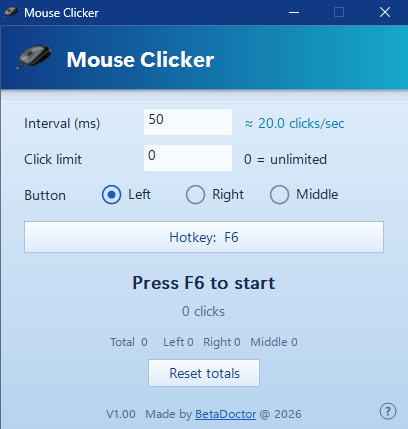
Some jobs are just clicking. The same button, the same spot, a few thousand times. Mouse Clicker does that part for you.
It is a single small exe. No installer, no account, no ads, nothing running in the background when you close it. Download it, start it, done.
Using it takes about ten seconds: set how fast you want it to click, move your pointer to the spot, and press F6. Press F6 again to stop. That is the whole workflow.
It is free, and the source code is included for anyone who wants to check what it does or build on it.
Made for Windows 11; should also run on Windows 10. The exe is not code-signed, so Windows may show a warning the first time you run it.